Technical Requirements
Whitelist Domains
It is important that schools whitelist all the domains listed below and all subdomains in these domains. TIMSS will use these domains and subdomains for the assessment, so they should all be marked as trusted.
Whitelist the following domains:
www.cmec.ca
https://timss.iea-online.net
https://timss.am.rm.com
https://timss-odc.net
https://www.speedtest.net/
Internet Speed Test
Complete an internet speed test on one of your school’s devices. The speed test provides an approximate value of the school’s internet download and upload speeds for the sole purpose of TIMSS administration; it is not a test of the school’s overall internet performance.
The device used to perform the speed test should be connected to the internet via wifi and not an ethernet cable (unless students will be using devices which connect to the internet via an ethernet cable). Please aim to run the internet speed test during the school’s peak times (i.e., when the internet is most heavily used).
Please use the following link to launch the speed test (available in English only):
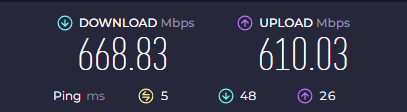
The speed test screen will appear. Please click on “GO” and wait for the download and upload speed tests to run. A screen with the final values will be displayed as shown in the following example screenshot.